- You Have Problem with Cannot Print?
- Make sure you already connect wifi MMKSI – Employee
- Your Notebook Suddenly Freezes/Flickering or Blanks on The Screen?
I have a few steps for fixing your notebook
Step 1:
- You can push this button on the keyboard at the same time CTRL+SHIFT+ESC or CTRL+ALT+DEL and then choose Task Manager
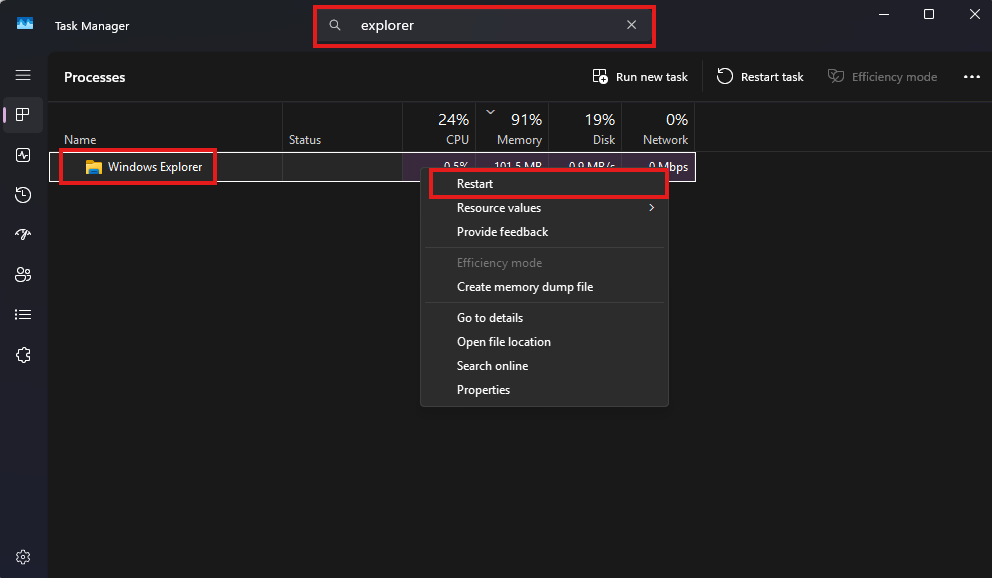
- Search Explorer on search column, Right klik on Windows Explorer and then choose Restart. This action will refresh your explorer
Step 2:
- You can push this button on the keyboard at the same time Windows+CTRL+SHIFT+B. This step will refresh your graphics card
Was this article helpful?
That’s Great!
Thank you for your feedback
Sorry! We couldn't be helpful
Thank you for your feedback
Feedback sent
We appreciate your effort and will try to fix the article